

Reusable Profiles
One author profile powers bylines across blog posts, event writeups, and other content

Before you start
What you'll find in this reference
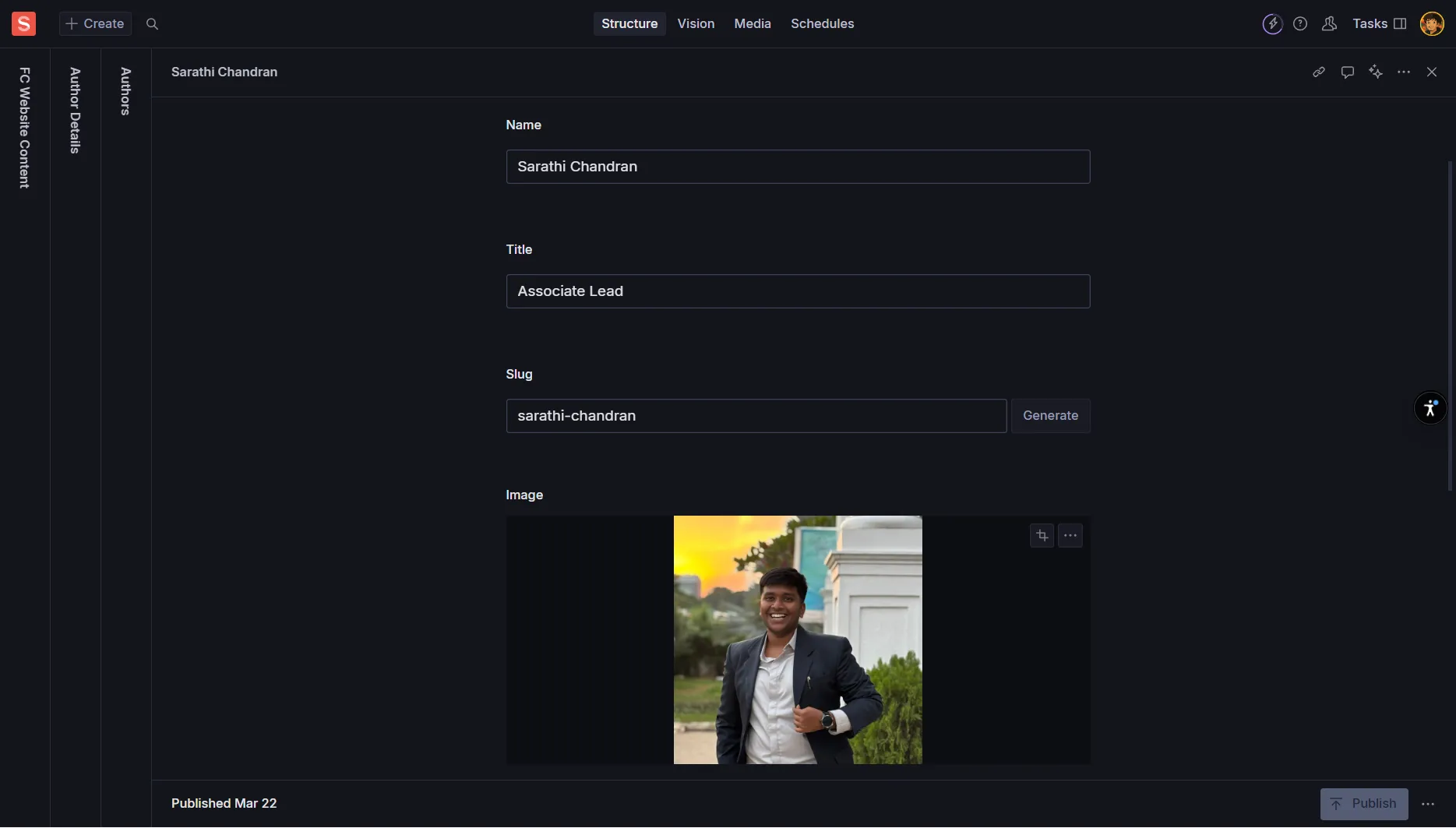
The Author component is a reusable content type for people who write or appear as bylined contributors across your site. This includes founders, team members, guest writers, speakers, and other content creators. It powers bylines on posts, author cards, speaker profiles, and optionally dedicated author profile pages.
Reusable Profiles
One author profile powers bylines across blog posts, event writeups, and other content
Professional Presentation
Consistent headshots, bios, and social links maintain professional credibility
Content Attribution
Clear authorship builds thought leadership and expertise recognition
Name
Required - Full name as it should appear on bylines
Example: “Priya Sharma” or “Dr. Rajesh Kumar”
Use consistent casing and diacritics; match public presence
Slug
Required - URL-friendly identifier (if author pages are routable)
Auto-generated from Name; keep short and readable
Example: “priya-sharma” or “john-doe”
Role/Title
Required - Author’s current title or position
Example: “Co-founder & CEO”, “Head of Growth”, “Guest Contributor”
Keep current; update when author’s title changes
Headshot/Image
Required - Professional photo
Square or portrait format, 800×800px or larger
Add descriptive Alt Text: “Portrait of Jane Doe”
Prefer clean background for consistency
Short Bio
Required - Brief summary for cards and bylines
1-3 sentences, 40-80 words
Write in third person unless site uses first person consistently
Focus on expertise relevant to content topics
Primary Link
Optional/Recommended - Main professional profile
Personal website, LinkedIn, or company profile
Use https:// format for external links
Long Bio
Optional - Full profile for dedicated author pages
Rich text with headings, lists, and links
Include background, expertise, achievements
Add disclosures for investments or affiliations
Pronouns
Optional - Gender pronouns for inclusive presentation
Examples: “she/her”, “he/him”, “they/them”
Displays in author cards and profiles
Location
Optional - Geographic location
Examples: “Mumbai, India”, “Remote”, “San Francisco Bay Area”
Useful for event attribution and networking
Expertise/Tags
Optional - Topics the author writes about
Array of strings: “fintech”, “growth”, “pricing”, “fundraising”
Use controlled vocabulary to keep filters organized
Helps readers find expertise-specific content
Affiliations
Optional - Companies, funds, or communities
Array of organization names or references
Examples: “Y Combinator”, “Sequoia Capital”, “Founders Club”
Availability
Optional - Services offered
Boolean fields: “Speaking”, “Advising”, “Investing”
Include optional notes or booking links
Provider/Label
Required - Platform name
Examples: “LinkedIn”, “X/Twitter”, “GitHub”, “Substack”, “YouTube”
Use consistent naming across all authors
URL
Required - Full profile URL
Must start with https://
Link to official/active profiles only
Avoid duplicates across provider types
Handle
Optional - Username for display
Example: @username
Useful for social media attribution
Essential Platforms
LinkedIn - Professional networking (highly recommended)
Personal Website - Portfolio or professional site
Company Profile - If representing an organization
Content Platforms
Substack/Newsletter - For regular content creators
Medium - For published articles and thought leadership
GitHub - For technical contributors and developers
Social Platforms
X/Twitter - For industry conversations and updates
YouTube - For video content and speaking
Instagram - For behind-the-scenes and culture content
Featured
Optional - Boolean toggle for highlighting
Surfaces author on listing pages and carousels
Use for key team members, frequent contributors
Rotate periodically to showcase different voices
Visible/Active
Optional - Show/hide toggle
Hide authors without deleting their profile
Preserves historical bylines when toggled off
Useful for temporary contributors or departed team members
Sort Order/Priority
Optional - Numerical ordering
Lower numbers appear first in manual ordering
Examples: 1, 2, 3 for leadership team hierarchy
Related Content
Optional - Curated posts, videos, or resources
Manually selected content to feature on author pages
Showcase signature posts or key contributions
Authored Posts
Auto-Generated - Posts by this author
Often computed automatically by querying posts
Manual curation can override or supplement
Meta Information
Meta Title - Format: “Author Name | Brand”
Meta Description - 150-160 characters including core topics
OG Image Override - Custom social sharing image if needed
Structured Data
Schema.org Person - Developer implementation
Includes name, jobTitle, image, sameAs links
Enhances search engine understanding
OG/Twitter Bio Override
Optional - Shorter bio for social previews
Customized for social media card constraints
Different from main Short Bio if needed
Branded Backgrounds
OG Image - Custom image for social sharing
Author headshot with branded background
Consistent preview appearance across platforms
Blog Posts
Author Field - Reference to Author document
Multiple authors supported with drag-to-reorder
Lead author typically appears first
Event Writeups
Speaker Profiles - Can reference Author documents
Reuses headshot, bio, and social links
Maintains consistency across event documentation
Team Pages
Team Member Profiles - May integrate with Author system
Single source of truth for staff information
Consistent presentation across site sections
Tone and Voice
Third Person Preferred - “Jane leads growth at…” unless brand uses first person uniformly
Relevance Focus - Tie bios to topics the author writes about
Professional Tone - Maintain credibility and expertise positioning
Credibility Building
Expertise Connection - Link bio to author’s content topics
Thought Leadership - Reference signature posts or talks in Related Content
Disclosures - Include investment or advisory disclosures where relevant
Regular Updates
Quarterly Reviews - Refresh bios and check for role changes
Link Validation - Test all social and professional links
Image Updates - Replace low-resolution images when available
Consistency Maintenance
Expertise Taxonomy - Use controlled vocabulary for tags
Image Standards - Maintain consistent crop/aspect across authors
Featured Rotation - Rotate featured authors to showcase different voices
Duplicate Prevention
One Document Per Person - Avoid creating duplicate author profiles
Merge Process - If duplicates exist, merge and update all references
Naming Convention - Use consistent full names across all authors
Lifecycle Management
Deactivation Process - Toggle Visible/Active off for departed team members
Historical Preservation - Keep documents to maintain byline integrity
Role Updates - Refresh titles and affiliations as they change
Content Quality
Bio Relevance - Expertise aligns with authored content
Professional Presentation - Consistent tone and formatting
Accuracy Verification - All facts, titles, and affiliations current
Technical Standards
Link Functionality - All URLs tested and working
Image Quality - High-resolution headshots with proper Alt text
SEO Completion - Meta fields completed for author pages
Before Publishing Author Profiles
What's the recommended word count for Short Bio?
Which social platform is most highly recommended for authors?
What should you do with author profiles for departed team members?
What person should author bios typically be written in?
How often should you review and update author profiles?
Blog Posts
Byline Attribution - Author name, headshot, and short bio
Multiple Authors - Support for co-authored content
Author Pages - Link to full author profiles and related content
Event Writeups
Speaker Profiles - Reuse author data for event speakers
Consistent Presentation - Same headshots and bios across contexts
Social Attribution - Speaker social links and professional profiles
Team Pages
Staff Profiles - Integration with team member management
Role Consistency - Synchronized job titles across site sections
Biography Reuse - Same professional summaries in multiple contexts
Consistency
Single Source of Truth - One profile, multiple display contexts
Professional Presentation - Consistent headshots and bios
Link Management - Centralized social media and professional links
Efficiency
Reduced Duplication - No need to recreate profiles for each context
Centralized Updates - Change once, update everywhere
Quality Assurance - Single point for maintaining author information
What did you learn?