

High-Intent Surface
Contact pages are top conversion paths for prospects, partners, and talent acquisition
Before you start
What you'll find in this guide
Contact pages are critical conversion surfaces that capture high-intent prospects, partners, and candidates. A well-optimized contact component routes inquiries efficiently, reduces response time, and feeds your growth flywheel through CRM integration and automated follow-ups.
High-Intent Surface
Contact pages are top conversion paths for prospects, partners, and talent acquisition
Speed-to-Lead
Clear routing and instant alerts reduce response time and improve close rates
Signal Capture
Collects source, campaign, and qualification data critical for lead prioritization
Conversion Optimization
High-Intent Traffic: Contact forms capture visitors ready to engage
Speed-to-Lead: Faster response times directly correlate with higher close rates
Qualification: Capture company size, budget, and timeline for prioritization
Operational Efficiency
Automated Routing: Direct inquiries to the right team member instantly
CRM Integration: Feed leads directly into your sales and marketing automation
Source Attribution: Track which channels produce the highest-value conversations
Credibility Building
Professional Presence: Set clear expectations and response SLAs
Trust Signals: Show who you’re positioned to help and how
Social Proof: Include testimonials or logos near the form
Growth Flywheel
Lead Nurturing: Feed email lists and onboarding sequences
Partnership Pipeline: Streamline BD and collaboration inquiries
Content Source: Turn inquiries into case studies and testimonials
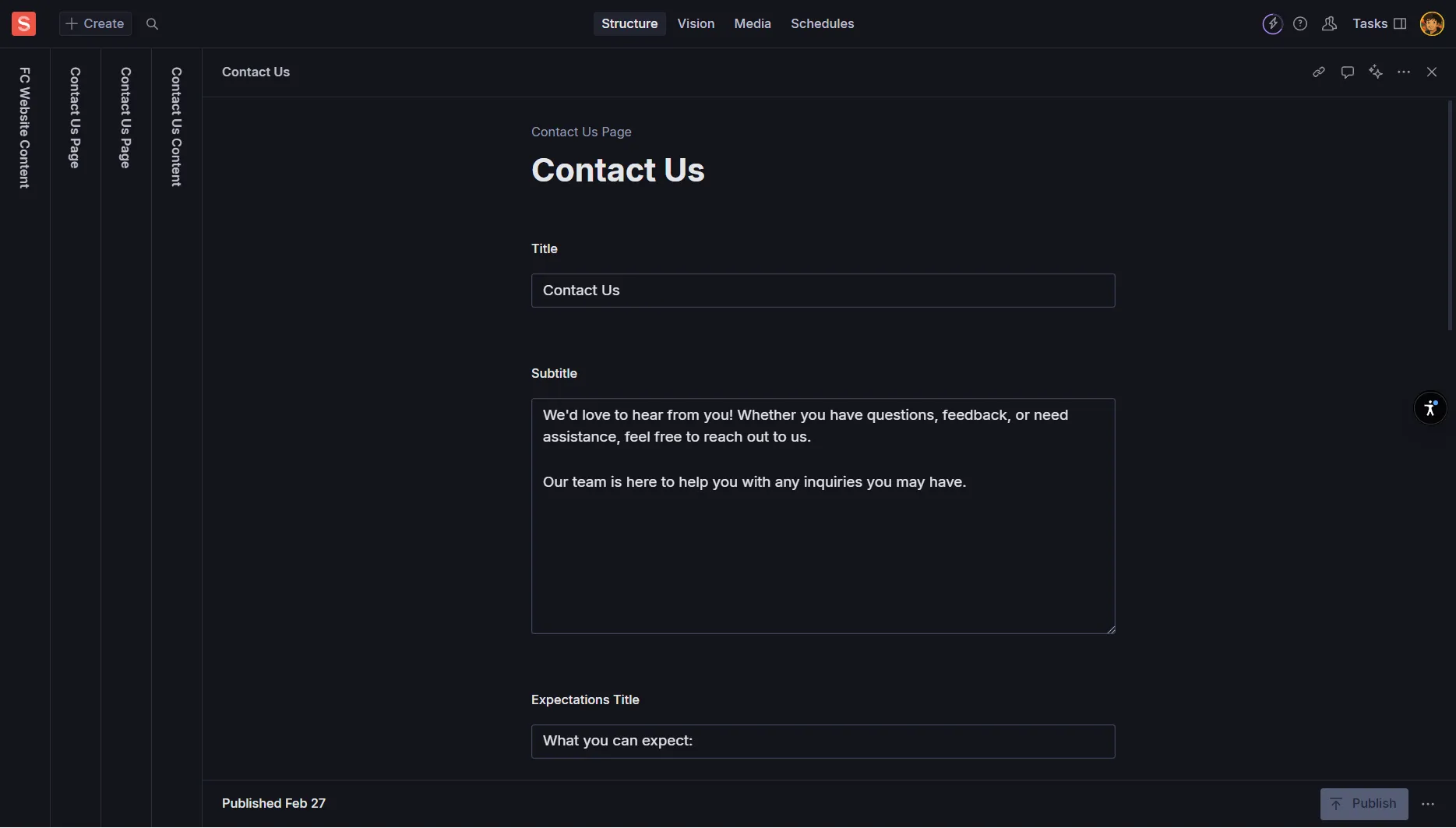
Title
Required - Page or section headline
Examples: “Get in Touch”, “Let’s Connect”, “Contact Our Team”
Keep clear and action-oriented
Sub Title / Intro
Optional - Sets expectations and context
Example: “We respond to all inquiries within 1 business day. Let us know how we can help.”*
Include response SLA and who should contact you
Cover Image / Icon
Optional - Visual element for the contact section
Always add Alt Text if using an image
Can be team photo, office image, or branded graphic
Full Name
Required - Complete name of the person contacting you
Single field is usually sufficient
Avoid splitting into first/last name unless CRM requires it
Work Email
Required - Professional email address
Use email validation to ensure format correctness
Consider rejecting disposable email domains for quality
Reason/Topic
Required - Purpose of their inquiry
Options: “Sales”, “Partnerships”, “Media/Press”, “Careers”, “Support”, “Other”
Keep to 4-6 clear options to avoid choice paralysis
Message
Required - Main inquiry content
Provide helpful prompts: “Tell us about your goals, timeline, and any relevant links”
Rich text or plain text depending on your needs
Company
Recommended - Organization name
Helps with lead qualification and routing
Optional but valuable for B2B contexts
Role/Title
Optional - Job title or function
Useful for understanding decision-making authority
Examples: “CEO”, “Head of Marketing”, “VP Sales”
Website/LinkedIn
Optional - Professional profile or company URL
Helps with lead research and qualification
Accept LinkedIn profiles, company websites, or portfolios
Budget Range
Optional - For sales-focused forms
Select options: “Under $10K”, “$10K-$50K”, “$50K-$100K”, “$100K+”
Adjust ranges based on your pricing model
Timeline/Urgency
Optional - Project timeline
Options: “ASAP”, “Within 1 month”, “1-3 months”, “3+ months”, “Just researching”
Helps prioritize follow-up activities
Phone
Optional - Contact number
Include country code instructions
Only add if you plan to make phone calls
Country/Region
Optional - Geographic location
Useful for timezone coordination and local regulations
Can help with market analysis and expansion planning
Consent Checkbox
Recommended - Required for legal compliance
Label: “I agree to the Privacy Policy and consent to be contacted”
Privacy Policy Link: Must link to your current privacy policy
Required for GDPR and other privacy regulations
Marketing Opt-in
Optional - Separate consent for marketing communications
Boolean Checkbox: Separate from general contact consent
Label: “Yes, I’d like to receive updates about events and resources”
Keep separate from required consent for contact
Data Retention
Policy - Define how long you retain form submissions
Document retention periods in your privacy policy
Implement regular purging for inactive leads
Security Standards
Guidelines - Protect sensitive information
Never ask for passwords or secrets in contact forms
Avoid file attachments unless absolutely necessary
Use HTTPS for all form submissions
Recipient Emails
Required - Array of email addresses for notifications
Use role-based addresses: sales@, partnerships@, support@
Avoid single-person bottlenecks that create delays
Routing Rules
Optional - Conditional routing based on inquiry type
If Reason=“Sales” → route to sales@company.com
If Reason=“Partnerships” → route to partnerships@company.com
Always include a default fallback route
Slack/Webhook
Optional - Real-time notifications
Send alerts to “#inbound” or “#leads” channel
Include key fields: Reason, Company, Email, Source
Enable faster response times for high-priority leads
Auto-Responder
Optional - Immediate confirmation email
Subject: “Thanks for contacting [Company Name]”
Body: Set expectations, include helpful links
Consider adding FAQ links or calendar booking for sales inquiries
Success Message
Required - Inline confirmation after submission
Example: “Thanks! We’ll reply within 1 business day.”
Set specific SLA and honor it consistently
Success Redirect
Optional - Redirect to thank you page
URL: “/thank-you” or “/contact-success”
Overrides inline success message if set
Good opportunity for additional CTAs or social proof
General Contact
Use Case: Multi-purpose inquiry form
Fields: Name, Email, Reason/Topic, Message
Routing: Based on Reason selection
Best For: Corporate sites with diverse inquiry types
Sales/Demo Request
Use Case: High-intent prospect capture
Fields: Name, Work Email, Company, Message
Routing: Direct to sales team
Best For: SaaS products, B2B services
Partnerships/BD
Use Case: Business development inquiries
Fields: Name, Email, Company, Website, Message
Emphasis: Mutual value and audience reach
Best For: Platform businesses, content partnerships
Media/Press
Use Case: Journalist and media inquiries
Fields: Name, Email, Outlet, Deadline, Message
Special: Faster SLA note (same day response)
Best For: PR-active companies, thought leadership
Contact Information
Name → contact.name (CRM field)
Work Email → contact.email
Company → account.name
Phone → contact.phone
Role → contact.job_title
Qualification Data
Reason → lead_type or lifecycle_stage
Budget Range → deal.budget
Timeline → deal.close_date_estimate
Source → contact.original_source
Activity Tracking
Message → latest_activity_note
UTM Data → original_source fields
Form Submission → contact_creation_date
Page Source → landing_page_url
UTM Parameter Capture
Hidden Fields that capture marketing data
utm_source, utm_medium, utm_campaign
utm_term, utm_content
Helps track which channels produce best leads
Session Data
Additional Tracking for attribution
referrer (where they came from)
landing_page (first page visited)
first_touch and last_touch timestamps
Value Proposition
Clear Statement: Who should contact you and why
Example: “Get expert guidance on scaling your B2B SaaS startup”
Social Proof: Add 1-2 credible logos or short testimonial near form
SLA Setting
Response Time: Promise realistic response time
“We respond within 1 business day during weekdays”
Business Hours: Include if relevant for urgent inquiries
Progressive Disclosure
Start Short: Name, Work Email, Reason, Message
Add Conditionally: Company field only if needed for triage
Optional Fields: Budget, timeline for qualification without friction
CTA Alignment
Match Business Goal: Button text aligned with primary objective
“Book a Demo”, “Request Access”, “Start Partnership Discussion”
A/B Testing: Test intro copy, field counts, CTA labels
Captcha Integration
reCAPTCHA/hCaptcha: Prevent automated spam
Coordinate with development team for implementation
Choose invisible captcha for better user experience
Rate Limiting
Submission Limits: Prevent spam bursts
Limit submissions per IP address per time period
Coordinate with development team for setup
Honeypot Fields
Hidden Traps: Catch basic spam bots
Hidden fields that humans can’t see but bots will fill
Reject submissions with honeypot data
Before Publishing
What's the recommended number of Reason/Topic options?
Which email addresses should you use for notifications?
What should you avoid asking for in contact forms?
Why are separate consent checkboxes important?
What's the benefit of UTM parameter capture?
Form Accessibility
Labels: Every input needs visible labels, not just placeholders
Error Messages: Provide clear, inline error messages with ARIA attributes
Keyboard Navigation: Ensure full keyboard accessibility and visible focus states
Visual Design
Color Contrast: Sufficient contrast for text and buttons
Alt Text: Add for decorative images; mark as decorative if non-essential
Responsive: Ensure forms work on all device sizes
Page Structure
Page Title: Include brand and “Contact” (e.g., “Contact | Founders Club”)
Structured Data: Consider ContactPage or Organization contactPoint JSON-LD
Meta Description: Describe what visitors can expect from contacting you
Content Quality
Clear Value Prop: Explain who should contact you and why
Response Expectations: Set clear SLAs and honor them
Professional Tone: Maintain consistent brand voice throughout
What did you learn?